How-to
Count Nonzero Integer File Elements Only After an HMI Edit
Short answer
Copy the editable integer file into a snapshot when the operator enters the edit screen. On the return request, compare current values against the snapshot element by element; if any element differs, count the nonzero elements while the terminal holds on a busy screen, then release navigation.
On this page
Count the nonzero elements of N37 only when an edit actually happened: copy the whole editable range into a snapshot file the moment the edit screen opens, and when the operator presses Back, compare the live file against that snapshot element by element. If every element matches, the session changed nothing and you release navigation without counting. If any element differs, set a busy state, count the nonzero elements one per scan, publish the result, refresh the snapshot, and only then let the terminal return to the previous menu. This works on a MicroLogix 1200 driving a PanelView 300 Micro over their direct serial link, using ordinary copy, compare and count instructions from the instruction set in publication 1762-RM001.
Define what counts as an edit #
A snapshot comparison detects net changes, not writes. If an operator changes an element and then restores its entry-time value before leaving, the file matches the snapshot and the count does not rerun. If your process needs every write to trigger a recount even when it is reversed, latch a changed bit from the terminal's write event instead; the rest of the sequence below stays the same.
Set the scan limit explicitly. The research here does not tell you how large N37 is in your application, so configure the compare and count to cover exactly the editable range and never address beyond it.
Capture the snapshot at screen entry #
When the screen-selection data shows the operator has entered the edit screen, copy the configured N37 range into a snapshot integer file of the same length and reset the pointer that the comparison will use. Do this once per entry, edge-conditioned on the screen number, so the snapshot always reflects the state the operator started from.
Run the comparison and count one element per scan #
When the operator presses Back, make that action set a return-request bit rather than navigate directly. On the return request, set the busy bit, clear the changed flag and the provisional counter, and start the pointer loop. Each scan while busy:
- Compare the current element with its snapshot value; if they differ, set the changed flag.
- Compare the current element with zero; if it is not equal to zero, increment the provisional counter.
- Advance the pointer by one.
After the last configured element: if the changed flag is set, copy the provisional counter into the published register the HMI displays, then refresh the snapshot from the live file so the next session starts clean. Clear the busy bit and set the return-permission bit. If the changed flag never set, skip the publish, refresh the snapshot anyway, and release navigation. One element per scan keeps the loop out of a single controller scan; a file instruction such as FAL can do the stepping under its control file if you prefer that form.
Worked example: 16-element N37 file, one element edited #
The inputs, with their sources:
- Editable range N37:0 through N37:15, sixteen elements. The thread names the file N37 but not its size, so sixteen elements is a declared example configuration; substitute your own range.
- Session start: N37:5 holds 12, every other element holds 0. These are example values; the snapshot now contains them.
- Operator action: N37:3 is changed from 0 to 25, then Back is pressed.
- Bench-measured controller scan time for this example: 10 ms. Measure your own; it is the only number that sets the busy duration.
The rule in words: an element counts when its live value is not equal to zero, and the count publishes only when at least one element differs from the snapshot.
The arithmetic: the loop covers sixteen elements at one element per scan, so the comparison spans sixteen scans, and at the 10 ms example scan time that is 16 × 10 ms = 160 ms of busy screen. Counting: N37:5 = 12 is nonzero, N37:3 = 25 is nonzero, the remaining fourteen elements are 0, so the provisional counter reaches 2. The changed flag sets because N37:3 now reads 25 where the snapshot held 0. The published count is 2.
Now the unchanged case: suppose the operator instead sets N37:9 from 0 to 40 and back to 0 before pressing Back. All sixteen live elements still equal the snapshot, the changed flag stays clear, the counter never publishes, and the busy screen clears after the same 160 ms of comparison without any new count.
Decision: with a sixteen-element range the whole busy period is roughly sixteen scans, short enough that the terminal merely flickers; as your real range grows, the busy time grows linearly with it, so measure the scan time on the running controller and confirm the busy indication stays readable rather than letting navigation happen mid-count.
Hold the operator on the busy screen #
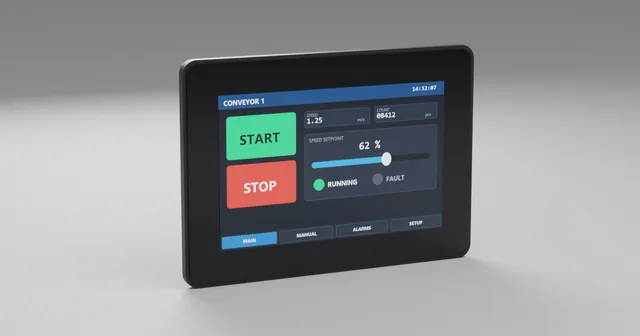
Use three separate interface states: return request, busy, and return permission. While busy is active the terminal must not switch screens and must ignore repeated edit or Back presses. Bind the busy indication and the return-permission data to controller addresses exactly as the terminal user manual, publication 2711-UM014, allows for the PanelView 300 Micro; the same PLC-bit visibility technique used to show a button only when a bit is high is what drives the busy display here (article:show-an-hmi-button-only-when-a-plc-bit-is-high). If your terminal application cannot bind its screen-selection objects to controller data, show the busy state as a message or indicator object instead and gate navigation in the controller.
Verify the completed sequence on the bench #
- Enter the edit screen and press Back without touching any value. Confirm no new count publishes and the previous menu becomes available after the comparison finishes.
- Change one element from 0 to a nonzero value and press Back. Confirm the busy state holds until the last element is processed and the published count includes that element.
- Change a nonzero element to 0 and confirm the published count drops by one.
- Change an element and restore its entry-time value. Confirm the session reports no net change, or switch to the latched-write design if that does not match your process.
One caution worth a sentence: the comparison window is also a window in which live setpoints in this file can differ from the snapshot, so if a running process consumes N37, verify the count logic on an isolated bench setup before connecting it to operating equipment.
Questions asked
What happens if the operator changes a value and then changes it back before pressing Back?
The snapshot comparison sees no difference, so the session counts as unchanged and no new count is published. That is the intended behavior when only net changes matter. If every write must trigger a recount even when the original value is restored, latch a changed bit on the terminal's own write event instead of comparing against the snapshot.
How does the PanelView 300 Micro know when to switch to the busy screen?
The terminal user manual, publication 2711-UM014, documents which screen objects can be bound to PLC addresses. Bind the busy indication, or the screen-selection data, to the busy and return-permission bits in the controller so the terminal shows the busy state while the comparison runs and switches back only when the controller clears the busy bit.
Can one instruction count the nonzero elements instead of a pointer loop?
The file instruction set documented in publication 1762-RM001 includes file operations such as FAL that step through an integer file under control-file supervision. You can use one for the comparison pass, but the counter still needs a condition on each element, and the busy handshake around the pass stays the same.