Explainer
Weintek recipe database record and word limits explained
Short answer
A Weintek recipe database holds up to 10,000 records only while the recipe definition also stays within 1,000 items and a 2,000-word allocation budget; the smallest ceiling sets real capacity. A 25-column recipe of 100-word strings needs 2,500 words and will not compile. Above the record ceiling the documented route is an SQL database, and the built-in CODESYS core changes none of these limits.
On this page
- The three documented ceilings
- Where each limit stops you
- The word arithmetic that decides compilation
- The record wall on the older panels
- Getting past the record ceiling
- Why the CODESYS core does not raise the limits
- Capacity check before you promise a merged table
- The decision for each case
- Questions asked
A Weintek recipe database holds up to 10,000 records, but only while the recipe definition also stays within 1,000 items and within a 2,000-word allocation budget. Three ceilings apply independently, and whichever you hit first sets your real capacity. A 25-column recipe built from 100-word strings needs 2,500 words and will not compile at any record count, while a lean layout leaves room for the whole part list. Below are the documented limits, the word arithmetic that decides whether a project builds, what to do about panels that once stopped near 2,000 records, and the direct answer on the built-in CODESYS core: it does not raise any of these limits.
The three documented ceilings #
The recipe database documentation fixes three limits, and a recipe has to satisfy all of them at once. The record count appears in the recipe database manual and in the limit message EasyBuilder Pro shows; the word budget appears in the same manual, which states that data exceeding it cannot be compiled.
| Ceiling | Value | What it constrains |
|---|---|---|
| Records | up to 10,000 per recipe | Stored rows; the HMI refuses new records at the limit |
| Items | no more than 1,000 per recipe | Columns or data fields in one record definition |
| Word allocation | up to 2,000 words per recipe database | The summed word allocation of the record layout; a recipe over it cannot compile |
Read the table as one rule: capacity is the smallest of the three ceilings for your design, not the headline record count.
Where each limit stops you #
The three ceilings fail at three different moments, which is why a project can build cleanly and still stop in production.
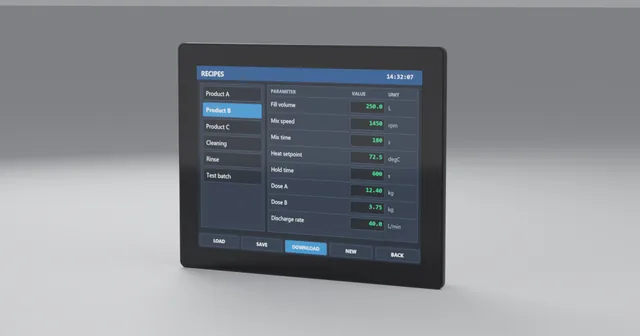
The item ceiling and the word budget bite at design time, in the EasyBuilder Pro editor and at compilation. Recipe data is created on the Recipe Database tab ([Data/History] » [Recipe Database]) before recipe objects can use it, so that screen is where both limits are crossed.
The record ceiling bites at runtime. When the table is full, the HMI shows Records reach limit (10000 records), no new records can be added. and refuses the entry. Nothing crashed and nothing is corrupt; the database is simply full, and the fix is architectural, not a setting.
The word arithmetic that decides compilation #
Every item in a recipe occupies a fixed word allocation: a string uses the word length you configure, and a 32-bit floating-point value uses 2 words. The budget test is one addition.
Example that fails. Twenty-five columns, each a 100-word string: 25 × 100 = 2,500 words. That is 500 words over the budget, and the manual is explicit that data exceeding it cannot be compiled. No record count rescues it; the layout itself is illegal.
Example that passes. A part record with 12 string fields at 40 words each and 6 floating-point process values:
- strings: 12 × 40 = 480 words
- floats: 6 × 2 = 12 words
- layout: 480 + 12 = 492 words
That leaves 1,508 words of headroom. The same part family needs 8,500 records today, which fits with 1,500 records to spare, so the two existing tables can merge into one recipe. Grow the same list to 12,000 parts and the layout still compiles but the record ceiling is exceeded: that is the point where trimming words cannot help and the answer is SQL.
The record wall on the older panels #
Two different 2,000s cause confusion here: the 2,000-word budget and a record wall near 2,000 records that earlier machines on this kind of retrofit ran into. Recipe Database manual V1.01 documents the higher ceiling, so the design basis is the manual, not the older observation. The project software matters too: the limits above were confirmed on a cMT2108X2 project built in EasyBuilder Pro V6.09.02.510.
Commit to the documented ceiling, then prove it once per model before promising a merged table. Build a throwaway recipe with 2,500 records, download it to the exact target panel, add one record at the HMI, and read the last row back. If a cMT2108 already in the field refuses near the old wall, its software state is the variable to resolve against current vendor documentation, but do not design new machines around the old number.
Getting past the record ceiling #
Above the record ceiling, the documented expansion is an SQL database: the recipes move off the HMI into a database that SQL-capable HMI models read and write directly. Check the exact panel model's documentation for SQL recipe support before planning around it, because the units already installed are usually the blocker, and a panel without the feature cannot host the database. In that case the database lives on a server or gateway off the panel, which is the same architecture decision as logging PLC data to SQL with a gateway instead of the HMI rather than loading the panel with the connection.
Put the maintenance cost in the proposal: a floor-running SQL database needs backups, a host someone owns, and a recovery path. That is the honest trade, and the cost is bounded; a part list beyond the built-in ceiling with no expansion path is not solvable at all.
Why the CODESYS core does not raise the limits #
The recipe database is an HMI feature, and its ceilings are fixed in the HMI. The built-in CODESYS core runs control logic; it exchanges data with the HMI through ordinary tag mapping, the same mechanism covered for mapping Weintek BACnet values into a CODESYS program, and no mapping changes the recipe limits.
A PLC-side recipe array is therefore custom data management, not a recipe extension: you engineer the retention, the part-number indexing, the editing screens, and the backup and restore yourself, and the built-in recipe objects will not treat that array as a recipe database. Decision: do not offer the CODESYS core as a route to more records. If the part list exceeds the ceiling, choose SQL.
Capacity check before you promise a merged table #
Run this check in order; each step is one ceiling from the table above.
- Count the records: parts on the list today plus the part types the customer plans to add. If the total exceeds the record ceiling, go to SQL now; nothing downstream changes that answer.
- Count the items in one record and keep it under the item ceiling.
- Sum the word allocation of every item and compare it with the word budget, leaving margin for future columns.
- Compile the project. A recipe that stops compiling after columns were widened or added has almost always crossed the word budget, so check the sum before anything else.
- Bench-test the exact panel model: download the recipe, create records past the old record wall, read the last row back, power-cycle, and confirm the rows persist.
- Treat a recipe write as a process change: test transfers on the bench or with the machine in a safe state, and keep E-stop and guard interlocks in the safety chain where no recipe value can reach them.
The decision for each case #
- Records and layout both inside the ceilings: merge the two part lists into one recipe database; with the 492-word layout above, a list of 8,500 parts fits with room to grow.
- Layout over the word budget: shorten string allocations, since part names rarely need 100 words, or split the columns; do not fight the compiler.
- Part list over the record ceiling on new machines: SQL-capable HMIs with the recipe database on SQL, and include the floor's backup and recovery effort in the project scope.
- Existing panels without SQL support: keep the split recipe tables as the working fallback or add off-panel storage; no setting raises the built-in ceiling.
- The built-in CODESYS core: not a path to more records in any of these cases.
Questions asked
Is the record limit per recipe database or per HMI?
Per recipe database. Each one carries its own record count, item budget and word allocation, which is why a second recipe table works as a stopgap when the first fills up. The cost is operational: the operator searches two part lists, and the merged table still has to fit every ceiling inside one recipe database.
My recipe stops compiling after I widened the columns. What should I cut?
Cut word allocations, not data. Twenty-five columns of 100-word strings need 2,500 words and cannot compile; trimming each string to 40 words gives 25 × 40 = 1,000 words, which leaves room for numeric items inside the budget. Shorten the fields that are genuinely short, such as part names, and keep measurement columns at the size their data type needs.
Does the 2,000-word budget apply to each stored record or to the whole table?
It sizes the record layout, not the stored data. The budget covers the word allocation of one record definition, so a table of 10,000 stored records does not multiply it. Once the layout fits, compilation succeeds and the stored rows are limited separately by the record ceiling.