How-to
Sharing Recipe Data Records Between Two Comfort Panels
Short answer
Activate the Datarecord area pointer in both Comfort panel projects and point both at the same PLC data range; a data record saved on one panel then travels through that range and is received and stored locally on the other. Copying the recipe file between panels is not synchronization: it bypasses the transfer handshake, and each panel keeps its own local record store.
On this page
Yes — and the method is a PLC handshake, not a file copy. Activate the Datarecord area pointer in both Comfort panel projects and point both instances at the same PLC data range; a data record saved on one panel then travels through that range and is received and stored locally on the other. Copying the panel's recipe file does not synchronize records: it sidesteps the transfer control, the record selection and the busy and complete status, so it belongs to backup, not to operation. Below is the setup, one fully traced test record, and the fork that tells you which side is at fault when a record fails to appear.
What the Datarecord area pointer actually moves #
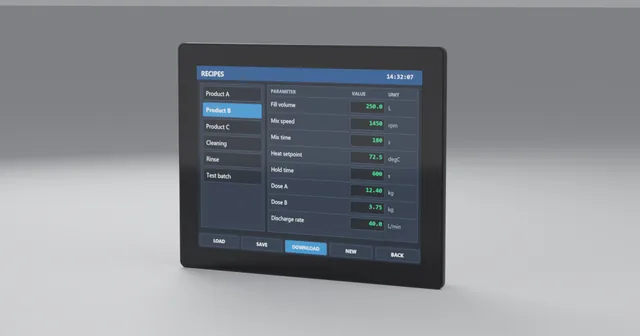
A recipe definition and a data record are different things. The definition is engineered structure in the project: its elements, their data types and the PLC tags they connect to. A data record is one saved set of values for that definition, and it is stored in the local memory of the panel where it was saved. Two panels can run identical recipe screens and still hold completely different record lists.
The documented exchange closes that gap through the PLC. When data records are transferred between an HMI device and the PLC, both partners use a common communications area in the PLC, and the Datarecord area pointer is the configured address of that area. It carries the control information of a transfer — which recipe and which data record take part, the command and its status — so the PLC and both panels coordinate one transaction. It is a handshake, not a shared disk: the range moves one record at a time from one panel's local store to the other's, and nothing else.
Align the recipe definition and reserve the range #
Do these before any runtime testing:
- Compare the recipe in both projects element by element: the same elements, in the same order, with the same data types and the same PLC tag connections. A matching screen layout proves nothing about the recipe underneath it, and mismatched definitions reject, truncate or misplace values at transfer time.
- If the definitions differ, correct and download both projects first. No transfer sequence compensates for incompatible engineering.
- Reserve one PLC memory region for the handshake. Read the exact layout and size of the Datarecord area pointer for your installed engineering version from the WinCC help system and allocate exactly that much — never size or offset the range from memory.
- Confirm nothing else writes inside that region. Control logic, a second HMI function or an overlapping allocation can flip a command or status word mid-transaction.
Enable the pointer in both projects #
- In each project, open
Connections > Area Pointer; an area pointer must be enabled and parameterized there before it is used. - Activate
Datarecordin both projects. The panel whose pointer stays inactive cannot take part in the exchange at all. - Point both pointers at the same PLC connection and the same data area, so both resolve to one memory region — the identical region, not tags with similar names. When the two sides resolve differently, each panel watches a different transfer state and writes appear to do nothing, the same failure pattern as why WinCC Flexible DB writes fail when area pointers do not match.
- Keep both panels on that one controller; one PLC behind two panels is the arrangement covered in connecting two HMI panels to control one machine.
- Gate the transfer requests so only one is active at a time; the gate can sit in the PLC program or in the HMI operating sequence.
- Give the operator busy, complete and failed feedback, taken from the status information the pointer defines, so a failed transfer is never silent.
- Download both aligned projects, then test with a disposable record before any production recipe moves.
Tracing one test record from panel A to panel B on two 15-inch Comfort panels #
Inputs.
- Two 15-inch Comfort panels running the same visualization project — your own arrangement.
- One recipe with an identical definition in both projects — from the alignment step above.
- One reserved PLC data range addressed by both Datarecord pointers — the documented common communications area.
- One disposable test record, saved on panel A — the object traced here.
Rule. A record saved on panel A exists only in A's local storage until a transfer writes its values into the PLC recipe tags. Panel B lists it only after its own transfer reads those tags and the record is saved locally on B. Both transfers are coordinated through the common area.
Arithmetic. For each record moved this way:
- Transfers: 1 (panel A to PLC) + 1 (PLC to panel B) = 2
- Value copies that must agree at the end: 1 (A's local record) + 1 (PLC recipe tags) + 1 (B's local record) = 3
- Operator actions in this example: 1 (save on panel A) + 1 (transfer request) + 1 (receive-and-save on panel B) = 3, against retyping every element by hand on the second panel for every change
Result. When the second transfer completes and the local save has run, panel B's recipe view lists the test record and all three copies carry the same values. Leave the view and reopen it on B to confirm the record persisted.
Decision. If the PLC recipe tags never take the test values, the fault is upstream: panel A's transfer request was not issued, the pointer addresses differ between the projects, the elements are not mapped to those tags, or the HMI-to-PLC connection is down — fix that side before touching panel B. If the tags hold the right values but B's list stays empty after its receive-and-save, the fault is downstream: the receive command, the record selection, a transfer still busy because another request hit the common area, or a local save that never ran. On the gate: the moment both panels are allowed to create records, the one-at-a-time interlock is mandatory before production; while only panel A creates records, you may drop it and hang B's receive on A's completed status.
Operating rules that keep the lists identical #
- Run one transaction at a time and let the PLC arbitrate whenever both panels can write records.
- Because the handshake lives in the PLC, the program can issue panel B's receive as soon as panel A's upload reports complete; the operator then saves once, on one panel, and the second list follows without a second entry.
- After each change, reopen the recipe view on both panels and compare the record name and every value. The lists are proven equal only by that comparison.
- With no transfer requested, the reserved range must sit still. Any movement means a second writer — find it before the next transaction, because it will strike mid-transfer.
Questions asked
Does the recipe screen have to be open on either panel during the transfer?
No. Data records transfer directly between the HMI device and the PLC, and in that situation the display on the device is not essential. Either panel can move a record while it shows any screen, so the PLC program or a scheduled panel task can run the exchange with no operator on the recipe view.
Which devices support the Datarecord area pointer?
The documentation covers Basic Panels, Panels, Comfort Panels and RT Advanced, so the same handshake also works when the partner is a PC runtime instead of a second panel. The device class changes only the layout you read from the help of your engineering version, not the principle: one common PLC area and one transaction at a time.
Both panels run the same downloaded project, so why do their record lists differ?
The download carries the recipe definition, not the records operators create at the machine. Data records live in each panel's local storage, so the lists drift apart the first time someone saves a record on one unit, and only a transfer through the shared PLC range brings them back together.
What happens if both panels request a transfer at the same time?
Both requests write the same common area, so the second command can overwrite the first mid-transaction and the record in flight is lost or mixed. That is the reason for the one-at-a-time gate: it belongs in the PLC program when both panels create records, and it can be left out only when the receiving transfer is triggered by the sender's completed status, which sequences the two by construction.
Is copying the recipe file between the panels ever acceptable?
Only as a managed backup or migration step for a single panel: with the runtime stopped, the storage location taken from that panel's documentation, and the file restored to the same panel configuration. As synchronization it fails by design, because it carries no transfer status, no record arbitration and no conflict handling, which is exactly what the area pointer provides.