Explainer
Why a CODESYS WebVisu touchscreen needs no internet access
Short answer
No internet is needed. WebVisu is served by the web server inside the CODESYS runtime on the controller, so a browser on the touchscreen needs only a local network path to the controller's address, or localhost when the browser runs on the controller itself. What you must verify is the WebVisu entitlement in the installed runtime license, separate from the programming software.
On this page
A CODESYS WebVisu touchscreen never needs internet access. The visualization is served by the web server inside the CODESYS runtime on the controller, so the only path that matters runs between the browser and the controller: a cable or the plant network to the controller's address, or localhost when the browser runs on the controller's own desktop. Internet comes into play only for remote engineering from outside the plant, never for operating the screen. What you do verify is the WebVisu entitlement in the installed runtime license, which is a separate check from the programming software on your engineering PC.
The runtime serves the page, not the internet #
The documented requirements are two: on the controller side, a runtime system that contains a web server with WebVisu support; on the client side, an HTML5-capable web browser. The browser renders the visualization and exchanges visualization data with that runtime. Your PLC application keeps reading the analog input module and processing commands exactly as before — the browser never talks to the I/O module directly, so every byte of the operator session stays on the plant network.
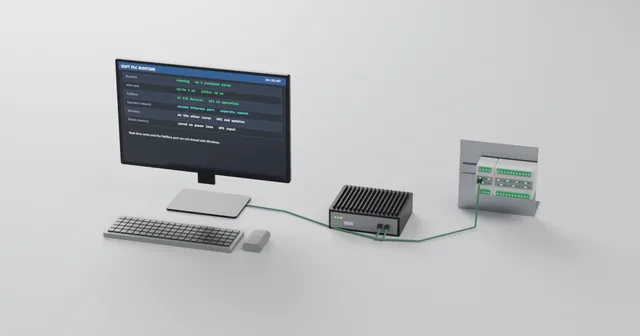
One design point follows from this. A software controller that also serves WebVisu shares one Ethernet stack with program downloads and I/O traffic, which is why a software controller needs a separate Ethernet operator path on a busy machine. None of that traffic needs to leave the building.
The browser address decides the path #
Read the address in the browser and you know which device it is talking to. localhost always means the device running that browser: on the controller's own desktop it means the controller, and on a phone it means the phone, never the controller. The documented defaults are port 8080 for the visualization service and webvisu.htm as the start page name, so a browser on the controller itself opens localhost:8080/webvisu.htm. A browser on any other device replaces localhost with the controller's reachable IP address, keeping the same port and page. Confirm the port in the runtime's web-service configuration and the page name in the project before trusting either default.
Bringing up a browser panel against a controller at 192.168.1.50 #
The inputs, each with its source:
- The controller's address: for example 192.168.1.50, read from the controller's own network configuration, not guessed.
- The service port: 8080, the documented visualization default; confirm it in the runtime's web-service configuration.
- The page name: webvisu.htm, the default start page; confirm it in the project.
- The demo window: two hours of running without a license, per the Visualization M product data sheet, after which a manual restart is required.
The rule: the browser's address is the controller's address, a colon, the service port, a slash and the page name, and the word localhost stands in for the address only when the browser runs on the controller itself.
The arithmetic: type 192.168.1.50:8080/webvisu.htm into the panel's browser. On an unlicensed runtime, an 8-hour shift divided by the demo window, 8 h ÷ 2 h, gives 4 runs, so someone restarts the controller 3 times mid-shift.
The result: the page loads and touch commands flow over one cable or the plant WiFi with no internet anywhere in the chain.
The decision: a screen that must run unattended past the demo window needs the visualization entitlement on the runtime's license; below that, demo mode with scheduled restarts is enough for a commissioning bench.
The license that matters is the runtime's #
WebVisu is available with the CODESYS Control license, and the check that counts is the license installed on the controller, not the one on the PC running the engineering tool. Having CODESYS programming software says nothing about which runtime features are enabled on the target. Without any runtime and visualization license, the software runs in demo mode for two hours and then waits for a manual restart — workable for evaluation, not for production.
Keep two alternatives separate from this decision. CODESYS HMI and the HMI SL bundle are a different product with their own installation and licensing, not a copy of your WebVisu screens. An OPC UA-based HMI instead needs the controller's OPC UA entitlement; CODESYS Control Basic L and CODESYS Control Standard S are application-based runtime options that include OPC UA Client/Server. For a touchscreen that reproduces the browser visualization, WebVisu is the direct route and the one that needs no extra package.
Work from the screen inward #
A missing page and a frozen sensor value belong to different diagnostic branches. Read the screen first, then move one layer in.
| What you see | Check next | What it means |
|---|---|---|
| The browser cannot connect | Destination address, service port, web service running | The page never loaded; fix access before touching any binding. |
| The page loads but values never change | Client connection status, bound PLC variables, live controller values | A rendered page alone proves nothing about live data exchange. |
| Values update but a button does nothing | Touch on a desktop control, then the element's input configuration | Separates an input-device fault from an application-command fault. |
| The local screen works, a phone cannot connect | The phone's address entry and its network path | Local operation never proves another device can reach the service. |
When values render as question marks instead of stale numbers, the usual root cause is the client's communication timeout, covered in why HMI values show question marks. Treat that as a path problem, not a binding problem, until the timeout is ruled out.
Choosing the screen that runs the browser #
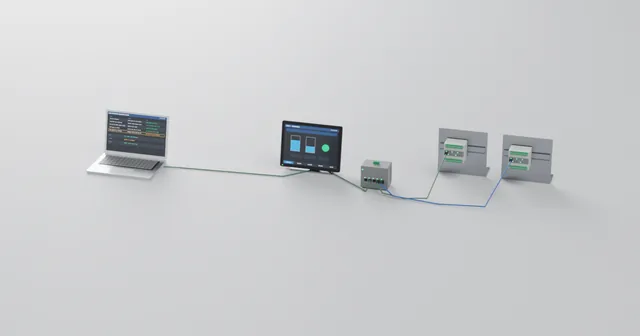
Two arrangements work. A display attached directly to the controller carries video over HDMI, but HDMI carries no touch back: the touchscreen's touch interface, typically a USB connection, must reach the controller and be recognized by its operating system before any CODESYS button is blamed. Test touch on an ordinary desktop control first. The second arrangement is a Linux- or Windows-based panel that runs its own browser and reaches the controller over Ethernet; when that operator station should be a full computer at the machine, choose from industrial panel PCs. An Ethernet socket alone does not make a display a WebVisu client — it needs the browser environment.
Two panel-side quirks are worth knowing before commissioning. A long touch opening a context menu is a browser behavior with its own remedy, explained in fixing the CODESYS WebVisu long touch right-click menu. And a station in a corrosive or washdown area changes the hardware shortlist, as covered in selecting a touch panel for CODESYS WebVisu in salt environments.
The decision, case by case: browser on the controller itself — localhost, no network at all beyond the machine. Browser on a panel or phone — any path that reaches the controller's address, cabled or wireless, internet not involved. Runtime without a visualization license — demo mode only, with a restart every demo window. Production screen — license the runtime's visualization and stop thinking about the clock.
Questions asked
Does the controller need a DNS server or default gateway for the panel to connect?
No. A browser connecting by IP address does no name resolution, and a default gateway only routes traffic that leaves the local subnet. Put the panel and the controller on the same subnet or a routed plant network and the page opens with no DNS, no gateway and no internet. Using a hostname instead of an IP address is the one case that needs a name server.
Can a phone on cellular data open the visualization?
Not directly. Cellular data puts the phone on the carrier's network, which has no route to a private plant address. The phone needs a path to the controller: the plant WiFi, or a VPN into the plant network. Internet access on the phone and reachability of the controller are separate conditions, and only the second decides whether the page loads.
Does the demo window close per browser or for the whole runtime?
For the whole runtime. The clock runs in the runtime, not in any browser, so when it expires every connected client loses its page at once. A manual restart of the controller resets the window for all clients together, which is why an unlicensed runtime cannot carry an unattended operator station.
Which browser works on the controller's own desktop?
Any HTML5-capable browser the controller's operating system can run; a lightweight Linux browser such as Epiphany is one option seen on these devices. The documented requirements are HTML5 support in the browser and a web server with WebVisu support in the runtime, not a particular browser brand. Test with a second browser before blaming the page when something renders wrong.